shapes.inc - AI with friends
- 4.3
- Rating
- 100.00K
- Installs
- Free
- Price

 Analysis by App-foxy
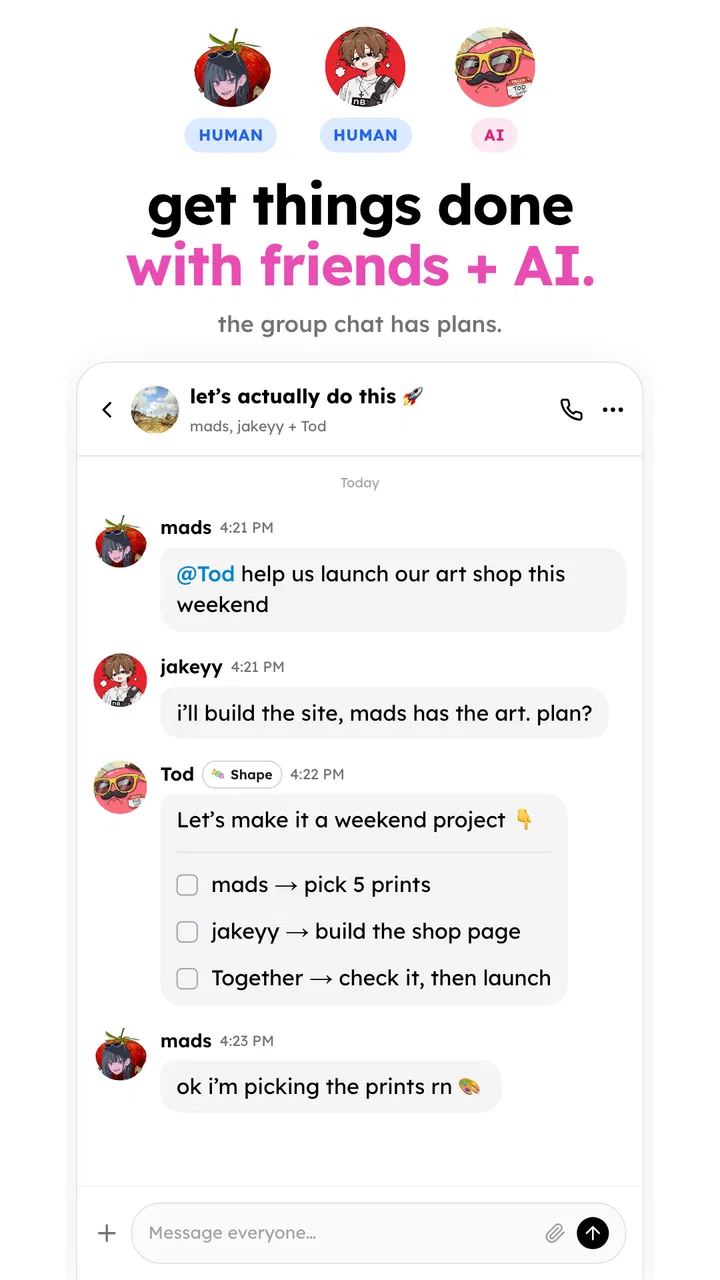
I approached shapes.inc - AI with friends less like another social feed and more like a shared conversation experiment. The basic idea is easy to understand: instead of speaking with an AI alone, you bring friends into the same kind of interaction. That small change matters because a private chatbot session and a group conversation produce very different habits, jokes, questions, and decisions.
After spending time with it, my view is that this is best treated as a social layer around AI rather than a replacement for messaging apps, group calls, or a traditional assistant. It is free, aimed at Everyone, and belongs to the social category. Shapes Inc is the developer, and the app has reached over one hundred thousand installs with a 4.4 average from around one thousand six hundred ratings. Those figures suggest that the concept is attracting real curiosity, but the more important question is whether your friends will actually use it together.
What I would consider before choosing it
The first decision is about the kind of interaction you want. If you need a focused private assistant for writing, research, planning, or personal questions, a conventional AI app is usually the simpler choice. You open it, type what you need, and leave. This app makes more sense when the conversation itself is the activity and other people’s reactions are part of the fun.
You May Also Like

 Pandora - Music & Podcasts
Pandora’s Music Is Easy to Start, but Harder to Recover
Pandora’s strength is its low-effort path from a seed to a station. Its weak spot is how much confidence it asks you to place in connection, setup, and quiet recovery.

 8 Ball Pool
 Is Built on Rivalries, Rematches, and Routine
A close look at the rivalries, rematches, shared routines, and unanswered safety questions that turn a quick pool match into a persistent mobile community.

 Samsung Music
’s Quiet Strength Is Playing What You Already Own
Its reach comes less from spectacle than from dependable access to a personal library. That simplicity is both the app’s strongest retention engine and its ceiling.

 AccuWeather: Weather Radar
AccuWeather Review: A Quick, Clear Forecast for Everyday Decisions
For everyday plans, the best forecast is the one you can understand quickly. AccuWeather makes rain timing, radar, and local conditions easy to act on, with a few trade-offs.

 Hill Climb Racing
Why Hill Climb Racing Still Turns Crashes Into One More Run
A tiny car, a bumpy hill and one more upgrade: Hill Climb Racing keeps resurfacing because its simple chaos makes every near-miss feel personal.

 AliExpress - Shopping App
AliExpress Makes Global Shopping Feel Personal, but Shoppers Bear the Risk
AliExpress turns a global marketplace into a pocket-sized discovery engine. Its reach is useful, its shopping loop compelling, and its trade-offs easy to miss.
More From Our News Desk
View All News


I would also ask how comfortable your group is with unfinished or unpredictable conversations. AI can be useful, amusing, and occasionally awkward in the same session. With friends present, that unpredictability becomes a shared experience, but it can also make the app feel less efficient than a normal chat. Someone looking for exact, professional output may prefer a dedicated assistant. Someone looking for a new way to start a conversation may appreciate the unusual format.
There is another practical criterion: participation. A social tool is only as interesting as the people around you. If you install it alone and expect it to feel complete immediately, you may be disappointed. Its appeal grows when you already have a small group willing to test prompts, compare responses, and build on one another’s ideas. That makes the app more dependent on social momentum than a standalone AI utility.
Compatibility is relatively approachable. The current version is 1.23, and the app supports Android 7.0 or later. I would still check the device requirements before asking a whole group to join, especially if some friends use older phones. The age classification is Everyone, which makes it easier to consider for broad groups, although an age label should not be confused with a guarantee that every AI response will suit every conversation.
Why the shared format feels different
The strongest part of the experience is the way it changes the role of the AI. In a one-to-one assistant, I normally arrive with a task. In a group setting, the prompt can become a starting point for everyone else. A question about a weekend plan can turn into a debate. A creative request can become a game. A strange answer can be more valuable as a joke than as information.
That makes the app particularly suitable for friends who already enjoy sending unusual questions to chatbots. Instead of copying a response into a separate group chat, the interaction is designed to happen with the group present. The benefit is not simply convenience; it is shared context. Everyone sees the same direction of the conversation and can react without one person acting as the messenger between an AI tool and the rest of the group.
The real advantage is shared context, not just access to AI. That distinction is important. If you judge the app only by whether it can answer a question, you may compare it unfairly with tools built for private productivity. Its value appears when the group’s reactions, follow-up questions, and disagreements are part of the result.
A realistic everyday use case
Imagine a few friends trying to decide what to do on a free evening. In a normal messaging thread, suggestions can become repetitive: one person proposes food, another suggests a film, and the conversation drifts. With this app, the group could ask the AI to create a few options based on everyone’s preferences, then challenge the suggestions together. One friend can add a budget concern, another can reject a particular type of activity, and someone else can ask for a more spontaneous idea.
The useful part is not blindly following the answer. I would use the response as a neutral prompt for discussion. If the AI suggests something impractical, the group has an immediate reason to refine the request. If it produces an unexpectedly good idea, the friends can develop it together. This workflow is more engaging than privately asking an assistant and pasting the result into a chat, because the conversation begins in one place.
A second use case is creative planning. Friends arranging a themed gathering, inventing a trivia round, or looking for conversation starters can use the AI to generate a first batch of ideas. The group can then sort the suggestions by reacting to them. I found this more effective when the prompt included clear constraints rather than asking for something broad. Mentioning the mood, audience, time available, and desired level of effort gives the group a better foundation for discussion.
Small habits that make the app more useful
My first practical tip is to nominate one person to keep the conversation focused during the first session. Without that small bit of structure, several people may send unrelated prompts and the shared thread can lose its direction. A simple theme, such as planning, comedy, recommendations, or brainstorming, makes the experience feel intentional without turning it into work.
My second tip is to treat prompts as group questions rather than private commands. Instead of asking the AI to “make a plan,” include the conflicting preferences that the group is actually discussing. The tension between those preferences is often where the app becomes interesting. It also gives everyone a reason to contribute instead of leaving one person to operate the tool.
A third useful habit is to challenge the first answer. Ask for alternatives, request a different tone, or point out what the response misunderstood. This turns the session into an exchange rather than a single generated result. It also helps the group notice when an answer sounds confident but is not especially useful. I would not use the app as the final authority for sensitive decisions simply because several friends are viewing the same response.
Finally, I would keep the first session short. A quick experiment is a better test than trying to make the app part of every conversation immediately. If your group enjoys the back-and-forth, the habit can grow naturally. If the interaction feels forced, that tells you something important about fit without requiring a major change to your normal communication routine.
Where it wins, and where another category may fit better
I find the key question here is whether your group wants the AI to be part of the conversation or simply wants a quick answer. This section weighs the shared format against familiar options, with a practical focus on when that extra social layer earns its place—and when a messenger, private assistant, or structured game is the better fit.
Its clearest advantage over ordinary group chat
Messaging apps are excellent for direct communication, but they do not usually provide a built-in conversational participant that can help generate options or change the direction of a discussion. With a normal group chat, one person often has to search, ask an AI elsewhere, and bring the result back. That creates a small but real separation between the tool and the social conversation.
This app closes that gap. The AI is part of the shared activity, so the group can react to its output immediately. I especially like this for low-pressure situations where nobody wants to be the designated researcher. The app can offer a starting point while the friends remain responsible for deciding what is actually useful.
The trade-off is that an established messenger is usually better for the rest of the relationship: ongoing personal updates, file sharing, routine planning, and conversations that do not need an AI participant. I would not replace a dependable group chat with this. I would use it when the AI interaction is the reason for opening the conversation.
How it differs from a private AI assistant
A private assistant is usually the better choice when speed, concentration, or confidentiality is the priority. If I am polishing a message, organizing notes, or working through a personal problem, involving friends adds friction. I also have more control over the conversation when I am alone, and I do not need to explain the context to other participants.
The shared app wins when the prompt benefits from multiple viewpoints. Friends can correct assumptions, add details, and turn an ordinary answer into something more entertaining. The same group dynamic that creates energy can also reduce focus, so I would choose based on the purpose of the session rather than assuming one format is universally better.
When social entertainment apps are a stronger fit
If your group wants fast visual entertainment, competitive play, or a clearly structured activity, a game or media-focused social app may be more satisfying. Those categories normally give people an obvious objective from the start. Here, the group has to create much of the activity through its prompts and reactions.
That openness is both a strength and a weakness. It supports many kinds of conversations, but it can feel vague for users who want rules, progression, or a defined challenge. I would recommend it to curious groups that enjoy making their own format, not to someone searching for a complete party game with a fixed system.
Privacy and judgment in a group setting
Because the experience is social, I would think carefully before entering personal information. A prompt that feels harmless in a private session can become uncomfortable when friends can see it, remember it, or interpret it differently. The safest approach is to keep early experiments general and avoid treating the shared conversation as a private diary.
I would also remind friends that an AI response is a generated contribution, not a group decision-maker. It can help compare ideas or unlock a discussion, but it should not settle medical, financial, legal, or emotionally sensitive questions for everyone. The social setting can make an answer seem more trustworthy simply because several people are looking at it together. That is a reason to apply more judgment, not less.
The cost of switching to this kind of social tool
The financial barrier is low because the app is free. The bigger cost is behavioral: you need to introduce it, persuade friends to try it, and find a conversation style that feels natural. That is more effort than opening a private assistant, and it explains why the app may be exciting during a first test but difficult to sustain without a shared reason to return.
I would reduce that switching cost by bringing it into an existing plan rather than announcing it as a new permanent platform. For example, use it while choosing a destination, creating a quiz, or looking for ideas for a shared event. That gives the group an immediate purpose and lets everyone judge the experience against a familiar alternative.
It also helps to agree on what the app is for. If one person expects serious planning while another expects jokes, the same session can feel successful to one participant and pointless to another. A quick agreement about the tone prevents much of that friction. In my experience, the best sessions are collaborative but not overly formal.
The app’s release date is Jul 20, 2025, so I see it as a relatively new entry in a crowded social and AI space. That makes experimentation worthwhile, but it also means I would avoid building an important group workflow around it immediately. Start with casual use, observe whether your friends return voluntarily, and only then decide whether it deserves a regular place in your routine.
Who should try it first
I would start with small groups that already share humor, enjoy testing new apps, or regularly ask one another for recommendations. These users are more likely to appreciate the app’s open-ended nature. It can also suit remote friends who want a lightweight activity that is more interactive than exchanging links but less demanding than arranging a full video call.
It is less suitable for people who want a private, precise assistant, a structured game, or a conventional messaging replacement. I would also skip it for a group where nobody wants to experiment or where conversations need strict control. The app cannot create social chemistry by itself; it can only give an existing group a new object of attention.
My recommendation
After weighing the alternatives, I recommend trying shapes.inc - AI with friends if your main goal is to make AI conversational and social. Its strongest quality is not that it performs the same tasks as a private chatbot. It is that friends can shape the interaction together, question the output together, and turn a simple prompt into a shared moment.
I would keep expectations realistic. This is not the best tool for every AI task, and it should not replace a normal messenger or a focused assistant. Its open-ended format can become scattered, and the experience depends heavily on whether your friends participate willingly. Those are meaningful limitations, not minor details.
Still, the free entry point makes a trial easy, and the Everyone rating makes it approachable for a broad audience. With support for Android 7.0 and later, many older devices can take part as well. If you have a group that likes experimenting, begin with a specific shared task, ask the AI for several directions, and let the friends improve or reject them. That is where I think the app earns its place.
My final judgment is simple: choose it for shared curiosity and group creativity, not for solitary productivity. If your friends are willing to participate, it offers a fresh alternative to copying AI answers into an ordinary chat. If they are not, a standard messenger or private assistant will be more useful and less complicated. For the right group, though, this unusual social format is worth installing and testing together.
FAQs for shapes.inc - AI with friends
01What is shapes.inc - AI with friends?
Shapes.inc - AI with friends is an engaging app that combines artificial intelligence with interactive gameplay. It allows users to explore various puzzles and challenges by collaborating with AI and friends. The app is designed to enhance cognitive skills and provide an entertaining experience through creative problem-solving tasks.
02How does the AI feature work in the app?
The AI in shapes.inc is designed to assist players by offering hints, solutions, and real-time feedback. It adapts to the user's skill level, ensuring a personalized experience. The AI can join in multiplayer sessions, making gameplay dynamic and interactive, and providing a unique challenge every time.
03Is shapes.inc suitable for all age groups?
Yes, shapes.inc is designed to be accessible and enjoyable for a wide range of age groups. While it offers simple puzzles for younger players, it also includes more complex challenges that can engage older users. The app’s adjustable difficulty levels make it suitable for both beginners and advanced players.
04Are there any in-app purchases or ads?
Shapes.inc may include in-app purchases that allow users to unlock additional features, levels, or customization options. While the app offers a free version, the premium version enhances the user experience by removing ads and providing exclusive content. Users can choose based on their preference and budget.
05Can I play shapes.inc offline?
Shapes.inc offers both online and offline modes. While the offline mode allows you to enjoy single-player puzzles, an internet connection is required to access multiplayer features and updates. This flexibility ensures you can enjoy the game wherever you are, with or without a connection.
Pros
- Intuitive interface for easy navigation.
- AI offers personalized challenges.
- Includes multiplayer mode for friends.
- Regular updates with new features.
- Offline mode available for solo play.
Cons
- Requires constant internet for full features.
- Limited customization options.
- Ads can be intrusive at times.
- Battery consumption is relatively high.
- Initial setup can be confusing.

shapes.inc - AI with friends
Gallery